
Last updated: May 2026 | Reading time: ~8 min
I am sure you’ve scanned one at a restaurant, or seen one on a bus ticket. And most likely you’ve probably paid for groceries with one. QR codes are everywhere across the world, and in India right now — on milk packets, temple donation boxes, and every UPI payment counter from Mumbai to Muzaffarpur.
But ask most people what QR actually stands for, or how that black-and-white square actually holds information, and you’ll get a blank stare.
This article fixes that.
QR Full Form: What Does QR Stand For?
QR stands for Quick Response.
That’s it. No complicated jargon. The full form of QR code is Quick Response Code… so named because it was designed to be read instantly by a scanner, faster than traditional barcodes.
The name was coined by Denso Wave, a Japanese company and subsidiary of Toyota supplier Denso, in the year 1994. A team led by engineer Masahiro Hara built it to track car parts moving through Toyota’s manufacturing lines. The goal was simple: pack more data into a scannable code, and read it fast.
They wildly exceeded that goal.
What is a QR Code, Exactly?
A QR code is a two-dimensional (2D) matrix barcode. Think of it as a barcode’s smarter cousin. While a barcode is just a series of vertical lines that can store about 20–25 characters, a QR code is a grid of black and white squares that can store up to 7,089 numeric digits or 4,296 alphanumeric characters.
That’s enough to hold a full website URL, a phone number, a Wi-Fi password, a UPI payment address, or even a short paragraph of text.
The meaning behind the pattern isn’t random. Every element has a role to play.
How Does a QR Code Actually Store Data?
This is where most explainers lose people. Let’s keep it grounded.
When you create a QR code, the data you enter — say, a website URL gets converted into a binary pattern (0s and 1s). That pattern is then laid out as black modules (squares) and white modules across a grid. The scanner reads the contrast between black and white, decodes the pattern, and gives you back the original data.
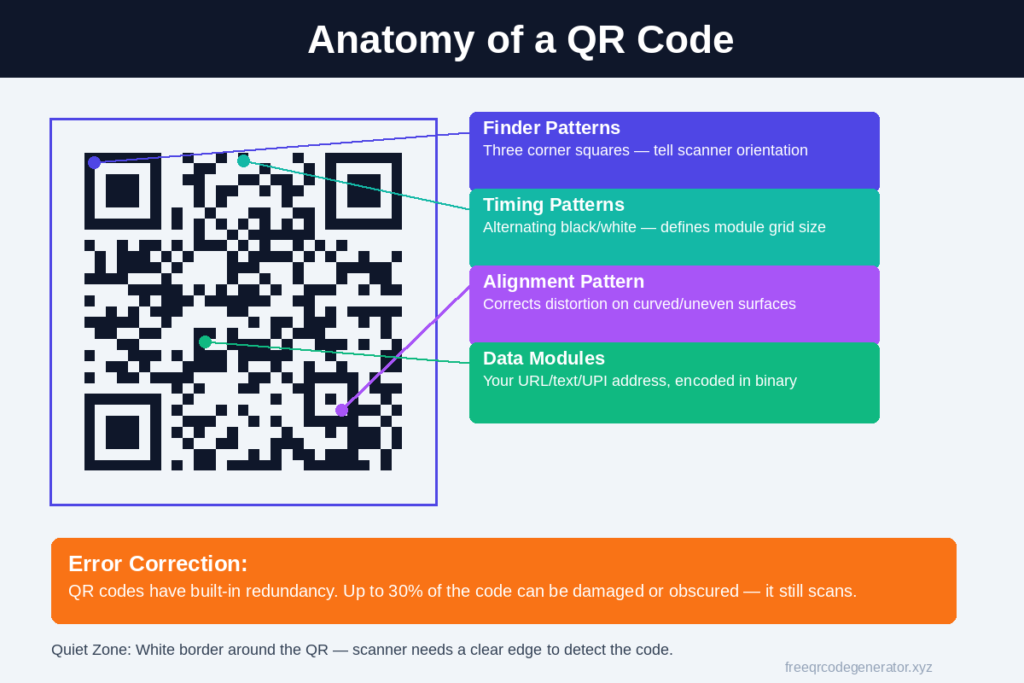
Here are the key parts of a QR code:
Finder Patterns
The three large squares in the top-left, top-right, and bottom-left corners. These tell the scanner: “This is a QR code, and this is how it’s oriented.” They’re why you can scan a QR code upside down or at an angle and it still works.
Timing Patterns
Alternating black and white modules that run between two of the finder patterns. They help the scanner figure out the size of the individual modules in the grid.
Alignment Pattern
A smaller square near the bottom-right corner (present in larger QR codes). It compensates for distortion if the code is printed on a curved or uneven surface.
Data Modules
The rest of the squares — this is where your actual information lives, encoded in binary.
Error Correction
This is genuinely clever. QR codes have four levels of error correction: L, M, Q, and H. At the highest level (H), a QR code can still be read correctly even if 30% of it is damaged or obscured. This is why you can put a logo in the middle of a QR code and it still works — the missing data gets reconstructed.
Put simply: even a partly damaged or dirty QR code works because the data is redundant by design.
QR Code vs Barcode: Key Differences
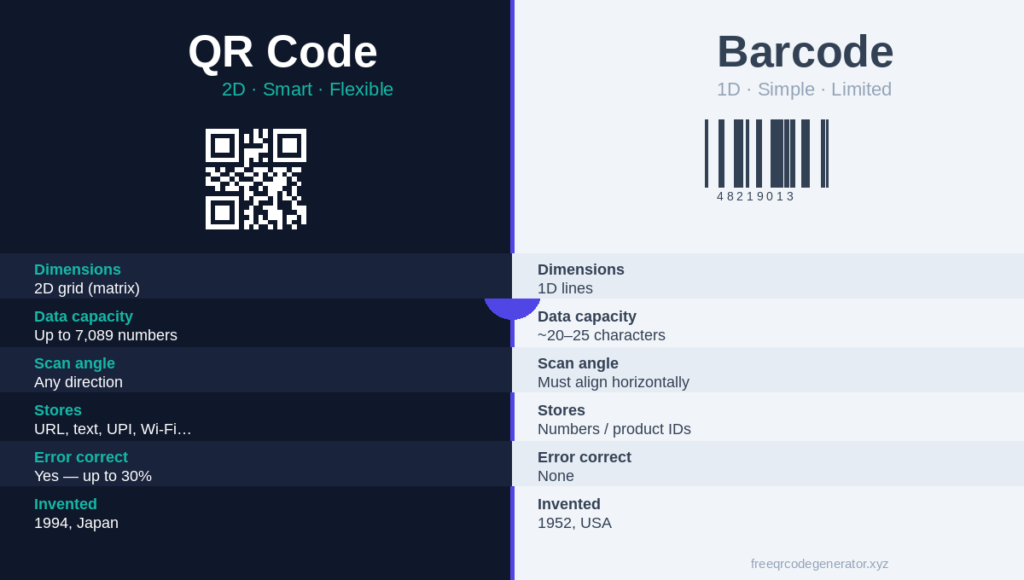
People often use “QR code” and “barcode” interchangeably. But they’re not the same thing.
| Feature | QR Code | Barcode |
|---|---|---|
| Dimensions | 2D (grid of squares) | 1D (vertical lines) |
| Data capacity | Up to 4,296 characters | ~20–25 characters |
| Data types | URL, text, contact, Wi-Fi, UPI | Mainly numbers |
| Scan direction | Any angle | Must be aligned horizontally |
| Error correction | Yes (up to 30% damage) | None |
| Invented | 1994, Japan | 1952, USA |
| Scanner needed | Smartphone camera | Dedicated barcode scanner |
For a shop selling one product with a fixed price — a barcode works fine. For a restaurant that wants to link customers to its menu, accept UPI payments, and collect Google reviews — a QR code does all three.
Types of QR Codes: Static vs Dynamic
Not all QR codes work the same way. There are two types.
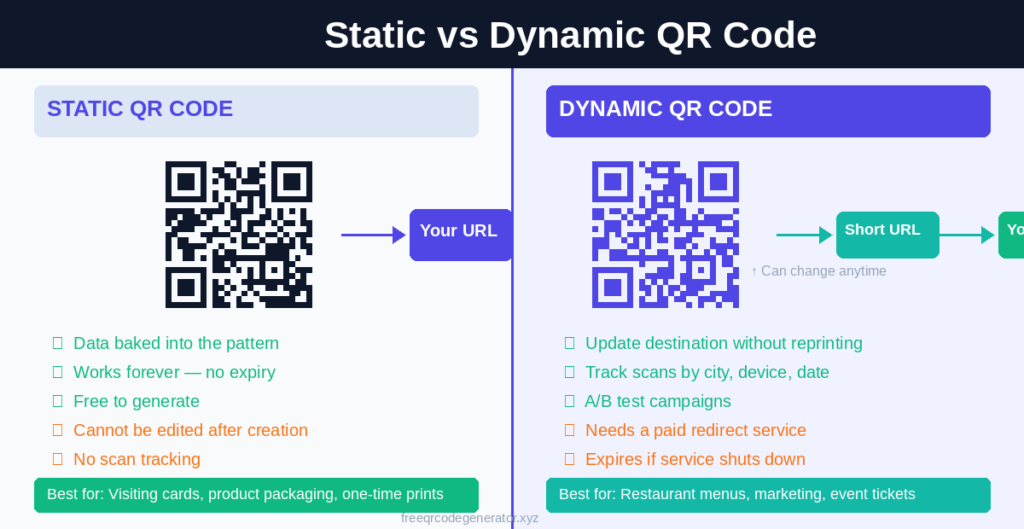
Static QR Codes
The data is encoded directly into the pattern. When you scan it, you get exactly what was programmed — a URL, a phone number, a text message.
The catch: you can’t change it. If you encoded the wrong URL, you have to generate a new code and reprint everything.
Static QR codes are free to generate and have no expiry. Good for visiting cards, product packaging, one-time flyers.
Dynamic QR Codes
The QR code doesn’t store your actual data. It stores a short redirect URL — something like https://qr.example.com/abc123. When scanned, that URL redirects to wherever you’ve pointed it.
The benefit: you can update the destination anytime without changing the QR code itself. You can also track how many times it was scanned, from which city, on which device.
Dynamic QR codes are what businesses use when they need flexibility — restaurant menus that change seasonally, event tickets, marketing campaigns with A/B testing.
Real-World Uses of QR Codes
1. UPI Payments in India
This is the big one. India has over 21.36 billion UPI transactions per month (as of Dec 2025). Almost all of them start with someone scanning a QR code.
Every shop — from Reliance to the chai tapri on your street — has a PhonePe, Google Pay, or Paytm QR code. You scan it, enter the amount, and pay. No cash. No card. The QR code stores the merchant’s UPI ID and sometimes a fixed amount.
The reason QR-based UPI works so well in India: it requires no hardware, no POS machine. Anyone with a printed sheet of paper can accept digital payments.
2. Restaurant Menus
Post-COVID, restaurant menus on QR codes became standard. You sit down, scan the code on the table, and the menu opens in your browser. No app needed, no physical menu to handle.
3. Boarding Passes
Every airline in India — IndiGo, Air India, SpiceJet — issues mobile boarding passes with a QR code. Airport security scans it. The code contains your flight number, seat, PNR, and passenger details.
4. Visiting Cards / Business Cards
Many professionals now print a QR code on their visiting card. Scan it, and the other person’s phone automatically offers to save your contact details — name, phone, email, website — without any manual typing.
5. Event Tickets
Concert tickets, IPL tickets, movie passes — QR codes are the standard. Each code is unique to the buyer, which makes counterfeiting hard.
6. Map Locations
Google Map locations can be easily generated and shared as a QR code for location. It simplies the process, and the location opens up in the map, as soon as it’s scanned.
7. Product Authentication
Luxury goods, medicines, and government documents use QR codes for verification. The Ministry of Health requires QR codes on pharmaceutical packaging under certain regulations. You scan it to confirm the product is genuine.
How to Scan a QR Code
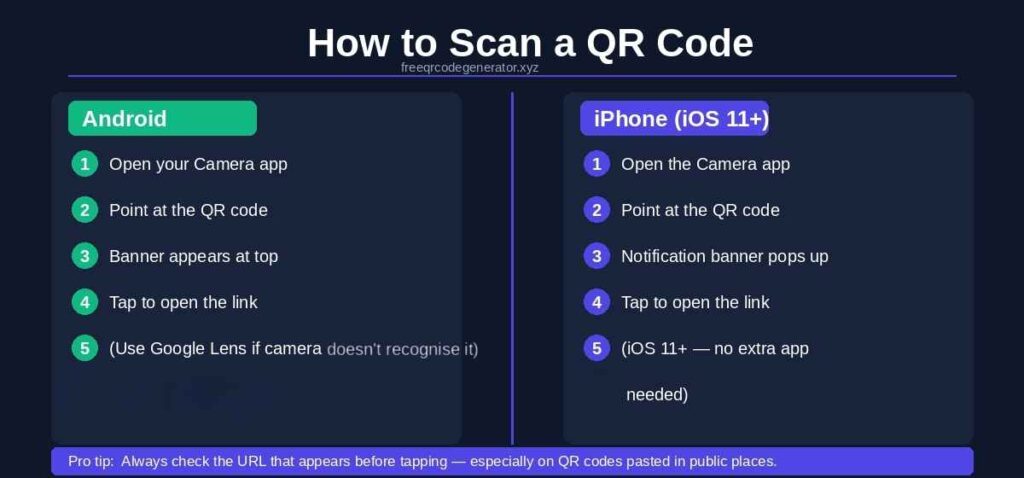
On Android
- Open your Google Lens app from the Google Search Bar.
- Point it at the QR code — no button, just hold steady.
- A notification or banner will appear at the top of the screen.
- Tap it to open the link or content.
Works on most Android phones running Android 9 and above. If your camera doesn’t recognize QR codes, open Google Lens from the camera app or search bar.
On iPhone (iOS 11 and later)
- Open the Camera app.
- Point it at the QR code.
- A notification banner appears — tap it.
Or go to Control Centre → Code Scanner for a dedicated scanner view.
Both methods require no additional app. Your phone’s built-in camera is enough.
frequently asked questions
Ready to Create Your Own?
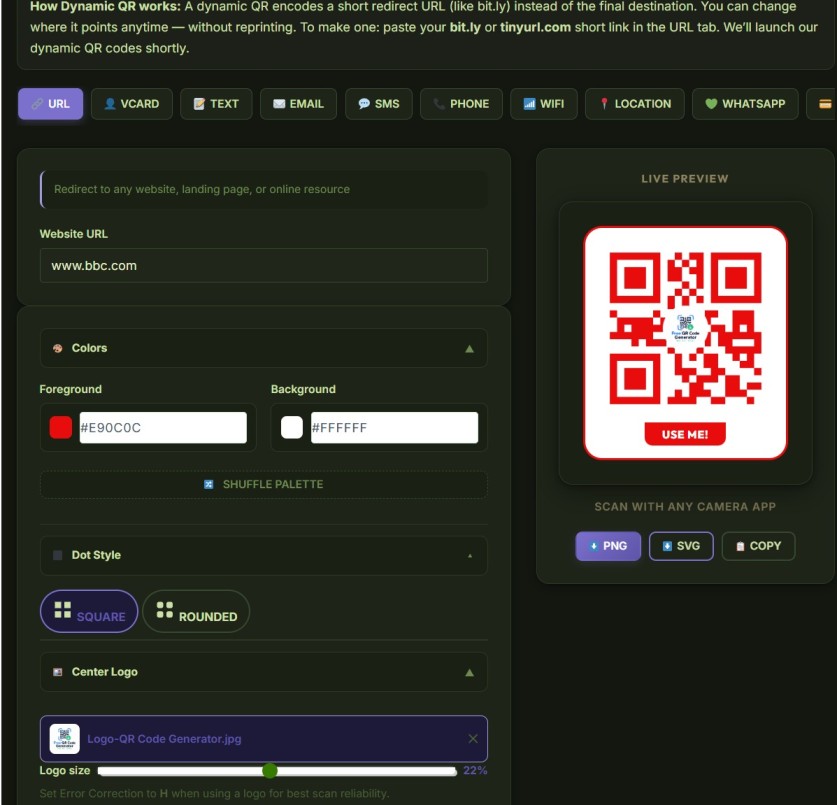
Now that you know what a QR code is and how it works — try making one. Create your first QR code for free .
Use our free QR code generator to create QR codes for links, text, UPI IDs, contact cards, Wi-Fi passwords, and more. No signup. No watermark. No limit.